Short answer: to connect Vapi to GoHighLevel, use Vapi's native integration for booking. In the Vapi dashboard go to Providers Keys > Tools Provider > GoHighLevel, click Connect, then create the four GoHighLevel tools (Get Contact, Create Contact, Check Availability, Create Event) and add them to your assistant. Booking works out of the box. Outbound calls triggered from a GoHighLevel workflow, and call results written back to the contact, still need webhooks and usually an automation tool like n8n.
I ran this exact setup for clients while scaling my AI agency past $50K a month on GoHighLevel, Vapi and n8n. It works. It also has more moving parts than the tutorials admit. Below is the full build, part by part, followed by the version I run now with no glue in the middle.
What you need before you start
- A Vapi account with an assistant that already handles a call well.
- A GoHighLevel sub-account with a calendar you can create and edit events on.
- A phone number for the assistant. Vapi can provide one, or you can import a Twilio, Vonage or Telnyx number.
- For outbound calls and call results: an automation tool (n8n, Make or Zapier) or a small server.
Part 1: let the agent book into GoHighLevel (native)
This is the part Vapi has built in, and it is solid.
Step 1: connect your GoHighLevel account
In the Vapi dashboard, open Providers Keys > Tools Provider > GoHighLevel, click Connect and approve access in the popup.
Step 2: create the GoHighLevel tools
Go to Tools > Create Tool, choose GoHighLevel, and create the four tools:
| Tool | What it does |
|---|---|
| Get Contact | Looks up the caller by phone, email or both |
| Create Contact | Adds the caller as a new contact if they do not exist |
| Check Availability | Reads open slots on a GoHighLevel calendar |
| Create Event | Books the appointment |
Check Availability and Create Event need your calendarId, which you find in GoHighLevel under Settings > Calendars.
Step 3: add the tools to your assistant
Open your assistant, go to the Tools tab, select the four GoHighLevel tools and click Publish.
Step 4: tell the assistant the order
This is the step people skip. GoHighLevel needs a contact before it will create an event, so the prompt has to enforce the sequence:
- Look up the caller with Get Contact.
- If there is no match, create them with Create Contact.
- Check Availability for the time they want.
- Book with Create Event.
The order your prompt has to enforce

Get Contact
Look up the caller
Create Contact
Only if there is no match
Check Availability
Needs your calendarId
Create Event
Needs the contactId
Use the exact tool names you gave each tool, and set the timezone explicitly. A timezone mismatch is the most common reason a booking lands at the wrong hour.
Know the limits. There are no native tools for cancelling or rescheduling appointments, so those need custom function tools or an automation. If Check Availability comes back empty when the calendar clearly has open slots, check the calendar ID and the calendar's permissions first.
Part 2: call a lead from a GoHighLevel workflow
The native tools cover the agent talking to GoHighLevel. They do not cover GoHighLevel telling the agent to call. For "new lead comes in, AI calls them," you build it yourself:
- Trigger: in a GoHighLevel workflow, use the trigger for your lead source (form submitted, Facebook lead form, contact created).
- Webhook action: add a webhook action that sends a
POSTrequest to Vapi's create call endpoint (https://api.vapi.ai/call) with your Vapi API key in theAuthorizationheader. - Body: pass your
assistantId, thephoneNumberIdto call from, and the contact's phone number ascustomer.number. Pass the contact's name and any form answers as variables so the agent can use them.
Test it with your own number first, and check that the phone number arrives in E.164 format (+15551234567). A missing country code is the usual reason the call never happens.
Part 3: get the call result back into GoHighLevel
This is the part that kept me up at night. After the call, you want the outcome on the contact: booked, not interested, call back later, voicemail. To get it:
- In Vapi, set a Server URL on the assistant so Vapi sends an end-of-call report when the call ends.
- Point that URL at an n8n (or Make) webhook.
- In n8n, read the summary, the outcome and the recording link from the report.
- Use GoHighLevel's API to find the contact, write the outcome to a custom field, add a note with the summary, and add a tag.
- In GoHighLevel, build a workflow that triggers on that tag or field and does the next step.
Call a lead and act on the result, the glued way
GoHighLevel workflow trigger
Form, Facebook lead or new contact

Vapi create call
assistantId, phoneNumberId, customer.number
End-of-call report
Sent to the assistant's Server URL

n8n flow
Reads the outcome, summary and recording
GoHighLevel API
Custom field, note and tag
Second GoHighLevel workflow
Triggers on the tag and does the next step
It works. But count the moving parts for one "call the lead and act on the result": a GoHighLevel workflow, a webhook, Vapi, a server URL, an n8n flow, the GoHighLevel API, a custom field, a tag and a second workflow. When any one of them changes, leads go cold quietly and you find out from a client.
What about Retell?
Retell has its own GoHighLevel integration. You create a Private Integration token in the sub-account (Settings > Private Integrations), copy the Location ID, and connect it in Retell's Integrations page. Its calendar tools can check availability, book, reschedule and cancel, and its contact sync can import contacts and write call analysis back. Outbound calls from a GoHighLevel workflow still need you to wire up the trigger.
When to stop gluing
The glue is fine with three clients. It got painful for me at scale, and not because any single tool was bad. It was because the voice agent, the CRM and the automations each had their own copy of the lead, and keeping them in agreement was a full-time job.
That is why I built StrideOps. Here is what the same setup looks like there:
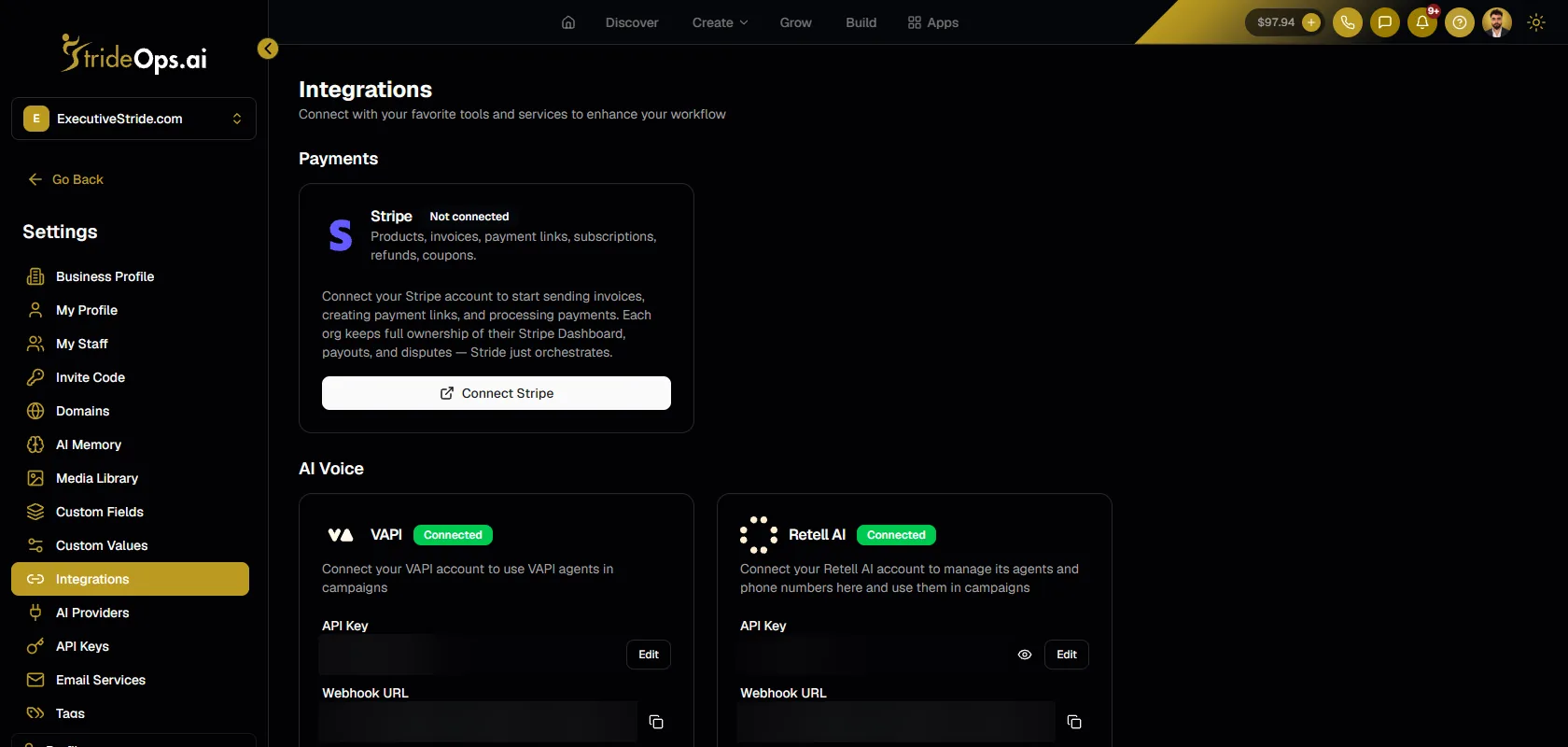
- Keep your Vapi agents. Paste your Vapi API key in Settings > Integrations. Your existing Vapi assistants and phone numbers show up in StrideOps, stay in sync, and edits you make in StrideOps push back to Vapi.
- Run your Vapi agents in campaigns. When you create a calling campaign, you pick the provider: StrideOps native, Vapi or Retell. The campaign handles calling hours, retries and do-not-call checks, and every call gets an outcome (booked, no answer, voicemail, callback) that moves the deal, tags the contact or starts the next step.
- Results come back by themselves. Vapi call events (started, ended, analyzed) trigger StrideOps workflows directly. No server URL, no n8n flow, no custom field to parse.
- Speed to lead is one workflow. A form, funnel or Facebook lead triggers a workflow, and the next step is an AI call from a StrideOps voice agent on a Twilio number. No webhook to anyone's API.
- Keep GoHighLevel while you switch. Connect your GoHighLevel account and contacts and opportunities sync both ways, so you can move one workflow at a time. The StrideOps browser extension imports your GoHighLevel workflows as drafts.
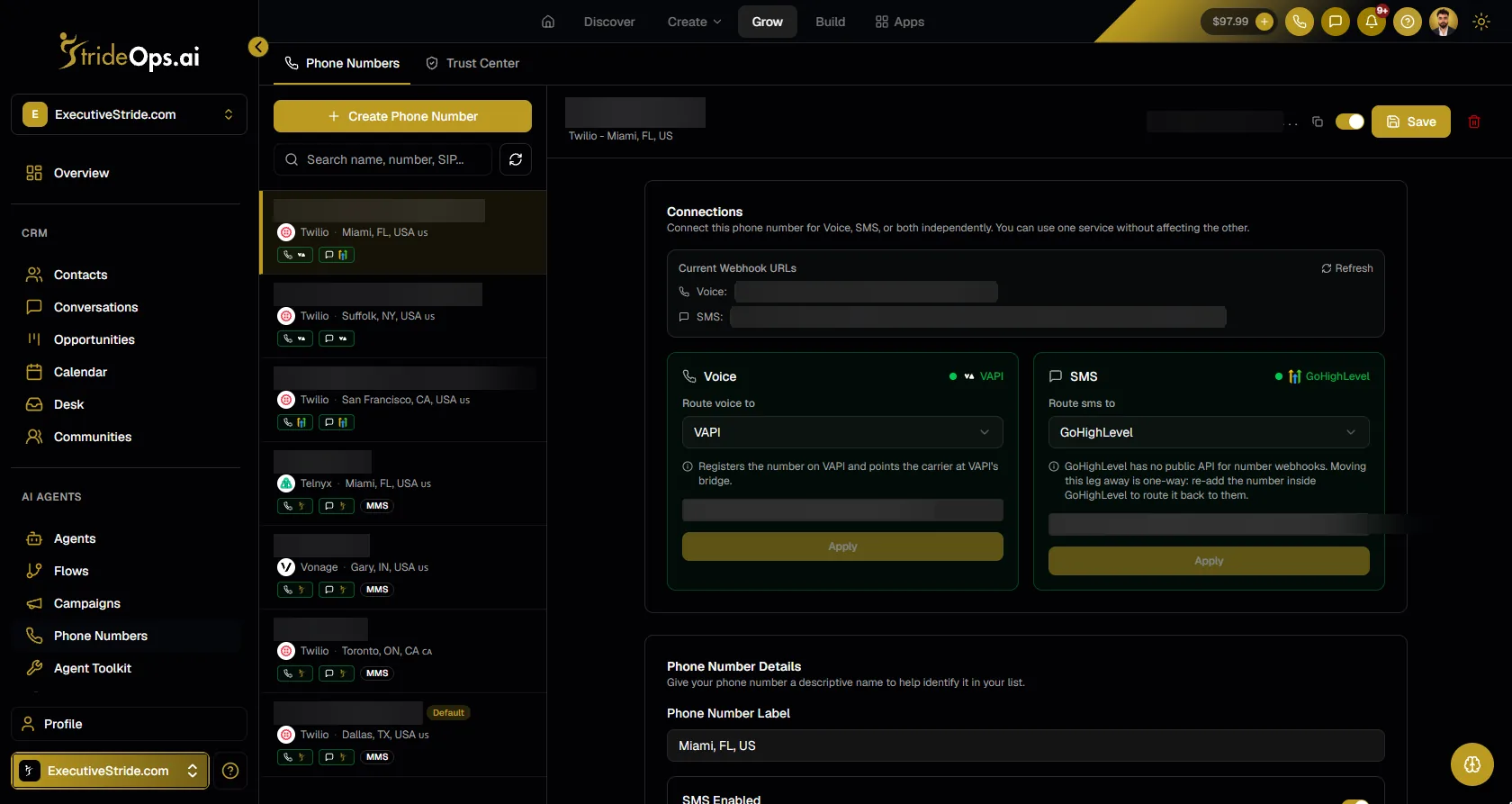
Two honest limits. Retell agents connect the same way, but Retell tools live inside Retell and are not synced, and pointing a phone number at a Retell agent needs SIP trunk setup on the Retell side. A Twilio number pointed at a Vapi agent is set up for you.
FAQ
The bottom line
Connecting Vapi to GoHighLevel for booking takes an afternoon. Making it call every new lead and act on every result takes webhooks, an automation tool and ongoing maintenance. If you are past a handful of clients, that maintenance is the real cost. See how StrideOps runs your voice agents inside the CRM and workflows, or how switching from GoHighLevel works.
Keep your Vapi agents. Drop the glue.
Connect your Vapi account, run your existing agents from workflows and campaigns, and keep GoHighLevel in sync while you switch.
About the author

Josh Pocock
Founder & CEO, StrideOps.ai
Josh Pocock is the founder and CEO of StrideOps.ai. He spent eight years building sales and marketing companies - most recently Executive Stride, the AI appointment-setting agency that now runs end to end on StrideOps.ai as customer zero. He went all-in on the platform full-time in late 2025.
Josh Pocock is the founder and CEO of StrideOps.ai. He scaled his own AI agency past $50K a month on GoHighLevel, Vapi and n8n, and his agency Executive Stride has built systems for 400+ businesses. StrideOps started as the platform he built to replace that stack.
Vapi and Retell setup steps from docs.vapi.ai and docs.retellai.com, checked 15 October 2026. Menu names change, so follow the vendor's current docs if a screen looks different.Read more
GoHighLevel Voice AI Review: Costs, Strengths, Trade-Offs
GoHighLevel Voice AI review: what it does well, what a call really costs per minute and per sub-account, the trade-offs, and who should use it in 2026.

GoHighLevel Pricing 2026: The Real Cost With Voice AI
GoHighLevel pricing in 2026: $97, $297 or $497 a month, plus Voice AI, AI Employee add-ons per sub-account and phone usage, from GoHighLevel's own pages.
After Hours AI Receptionist: Catch the Calls You Miss
After hours AI receptionist setup: answer every evening and weekend call, book the next open slot, route emergencies to on-call staff, and follow up by text.