Most advice on how to make an AI voice agent sound human starts with the voice. The voice matters, but it is rarely the problem. Agents sound robotic because they talk like a document: long sentences, perfect grammar, lists read out loud and numbers said the way they are written.
To make an AI voice agent sound human, write its instructions for the ear instead of the page, keep every turn to one or two short sentences, choose a voice that fits your callers, fix how it pronounces names and numbers, and test it against real interruptions and background noise.
Here are the nine fixes that make the biggest difference, roughly in order of impact.
1. Write for the ear, not the page
A prompt written like a policy document produces an agent that speaks like one. Tell it explicitly how to talk:
- "Speak in short, everyday sentences."
- "Never read lists out loud. Mention at most two options at a time."
- "Use contractions: you're, we'll, that's."
Then give it example lines in the tone you want. Examples steer an agent far better than adjectives like "friendly" or "conversational".
2. Keep turns short
Humans on the phone speak in short turns and hand the conversation back. Agents that answer in paragraphs feel like a recording. Set a hard rule: one or two sentences, then a question or a pause.
3. Ask one question at a time
"Can I get your name, phone number, email and the address of the property?" is a form, not a conversation. Ask for one thing, confirm it, then ask for the next.
4. Say numbers and times the way people do
"12:00 PM" read literally sounds wrong. People say "twelve" or "noon". Dates, prices and phone numbers need the same care: "Tuesday the 14th", "about two hundred dollars", phone numbers read in groups. Tell the agent how to say them, and check every one in testing.
5. Fix pronunciation of your names and terms
Your business name, street names, product names and industry terms are where agents trip most, and every mistake is a reminder the caller is talking to a machine. Add pronunciation rules for each one and listen to the result before going live.
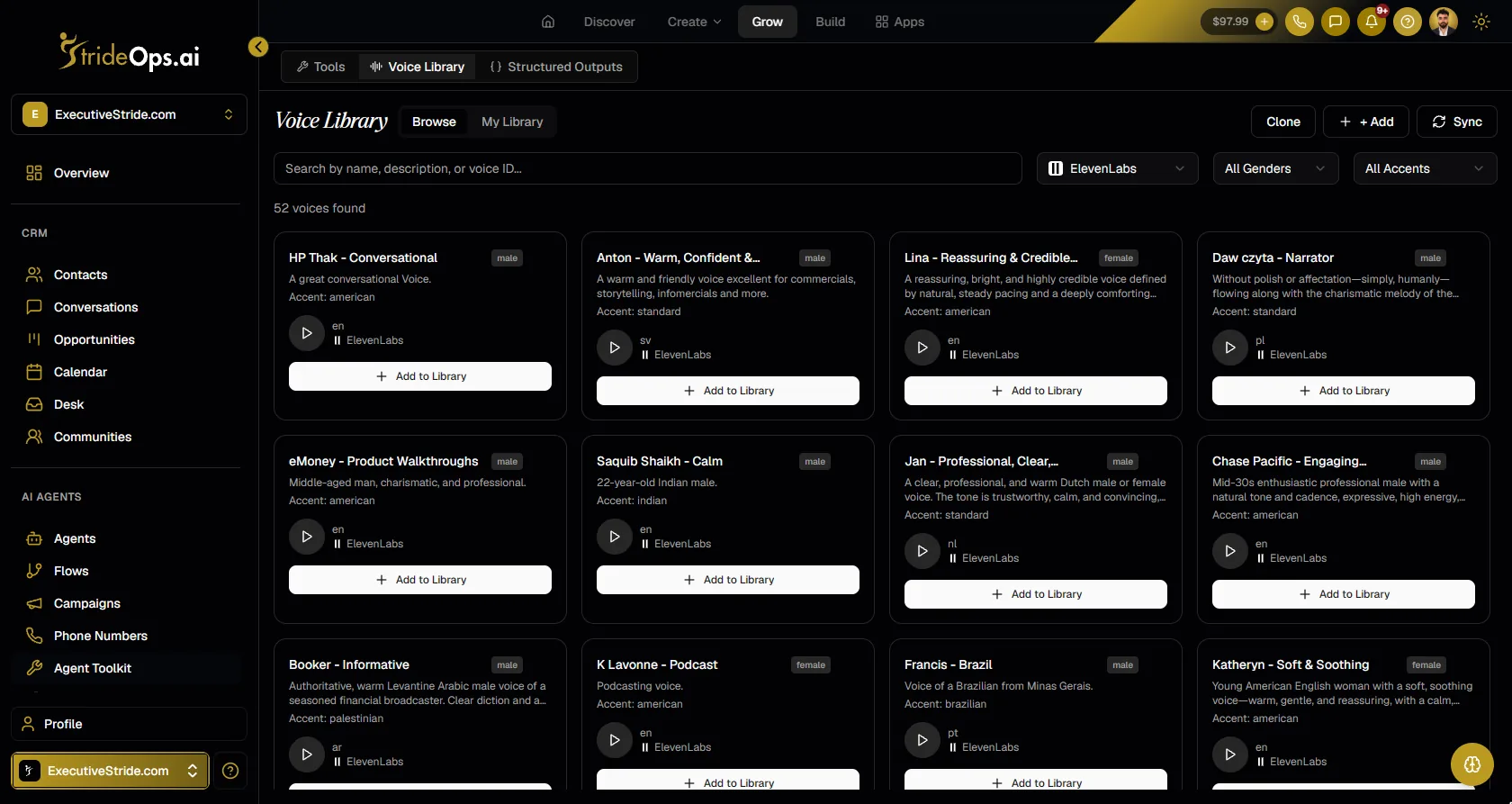
6. Choose the voice for your callers, not for the demo
Pick a voice that suits the job: calm and clear for a medical front desk, warm and quick for a home services line. Listen to it reading your actual greeting and a real answer, on a phone line, not a demo sentence through good speakers.
7. Let it acknowledge before it answers
Humans buy time with small acknowledgements: "Sure", "Got it", "Good question". A short acknowledgement before a longer answer makes pauses feel natural instead of dead air. Give the agent a few of these in its examples, and tell it not to repeat the same one every turn.
8. Handle interruptions gracefully
Real callers talk over the agent. A human-sounding agent stops, listens and responds to what was just said, instead of finishing its sentence or starting over. Test this specifically: interrupt it mid-answer and see what it does.
9. Test against real conditions
An agent that sounds human to you in a quiet office can fall apart on a noisy line with a fast talker. Test with simulated callers who interrupt, mumble, speak quickly or call from a busy street, and rerun the tests after every prompt change. See how to test an AI voice agent.
Robotic vs human: quick reference
| Sounds robotic | Sounds human |
|---|---|
| "Our business hours are Monday through Friday, 9:00 AM to 5:00 PM, and Saturday 10:00 AM to 2:00 PM." | "We're open nine to five on weekdays, and Saturday mornings too." |
| "Please provide your full name, phone number and email address." | "Can I grab your name first?" |
| "I have the following appointments available: ..." (reads six times) | "I've got Tuesday at ten or Thursday at two. Which is better?" |
| Starts every answer with "Great question!" | Varies short acknowledgements, or none at all |
How StrideOps helps
StrideOps voice agents let you set the pieces above directly:
- Pronunciation rules with audio previews, so you hear exactly how your business name and terms will be said before a caller does.
- A voice library to preview, filter and add voices, plus voice cloning.
- Swappable providers per agent: six speech-to-text providers, nine text-to-speech engines and eight language model backends, so you can change the voice or the model without rebuilding the agent.
- Background sound options for the call.
- Voice Flows for calls that need to follow a path, so each step can have its own short line instead of one giant prompt.
- Simulated callers with noise, interruptions and different speeds to test how human it really sounds.
See voice agents for the full picture.
FAQ
How do I make an AI voice sound more human?
Write short, conversational instructions with example lines, keep each turn to one or two sentences, ask one question at a time, fix pronunciation of names and numbers, and choose a voice that suits your callers. Then test it on real phone conditions.
Why does my AI voice agent sound robotic?
Usually because its instructions are written like a document. Long sentences, lists read aloud, literal numbers like "12:00 PM" and identical acknowledgements make an agent sound robotic more than the voice itself does.
Does the voice or the prompt matter more?
Both matter, but the prompt usually matters more. A great voice reading a long, formal answer still sounds like a machine; a decent voice speaking in short, natural turns sounds human.
Should an AI voice agent pretend to be human?
No. Sounding natural and being honest are compatible. Many businesses have the agent say it is an AI assistant, and callers mostly care that they get helped quickly.
The bottom line
Human-sounding agents are written, not just voiced. Short turns, one question at a time, numbers said the way people say them and correct pronunciation of your own names do more than any voice upgrade. Get those right, test on real phone conditions, and callers stop noticing the AI.
Build a voice agent callers enjoy talking to
Pronunciation rules with previews, a voice library with cloning, swappable providers and simulated-caller testing, inside your CRM.
About the author

Josh Pocock
Founder & CEO, StrideOps.ai
Josh Pocock is the founder and CEO of StrideOps.ai. He spent eight years building sales and marketing companies - most recently Executive Stride, the AI appointment-setting agency that now runs end to end on StrideOps.ai as customer zero. He went all-in on the platform full-time in late 2025.
Josh Pocock is the founder and CEO of StrideOps.ai. He scaled his own AI agency past $50K a month, and his agency Executive Stride has built systems for 400+ businesses. StrideOps started as the platform he built to replace that stack.
Read more
After Hours AI Receptionist: Catch the Calls You Miss
After hours AI receptionist setup: answer every evening and weekend call, book the next open slot, route emergencies to on-call staff, and follow up by text.
AI Receptionist Pros and Cons: Is It Worth It?
AI receptionist pros and cons for small businesses: the real benefits, the real drawbacks, and a quick checklist to decide whether one is worth it for you.
AI Receptionist Script: A Copy-and-Paste Template
AI receptionist script template to copy: identity, greeting, the calls it handles, booking, FAQs, guardrails, transfers and the close, with example lines.