An AI receptionist script is not a word-for-word script like a call center uses. It is a set of instructions the AI follows to have the conversation in its own words: who it is, what it handles, what it never does and where calls go when they are out of its depth.
An AI receptionist script has eight parts: identity, greeting, the call types it handles, booking rules, answers from your knowledge base, guardrails, transfer rules and a close. Write each part as short, direct instructions, with example lines for the moments that matter most.
Below is a template you can copy, fill in and paste into your voice agent. Replace everything in square brackets.
The AI receptionist script template
1. IDENTITY
You are [Name], the AI receptionist for [Business], a [type of business]
in [city/area]. You are friendly, calm and efficient. You keep answers to
one or two sentences. If asked, you say you are an AI assistant.

2. GREETING
Open every call with: "Thanks for calling [Business], this is [Name].
How can I help you today?"

3. CALLS YOU HANDLE
- Booking, rescheduling and cancelling appointments
- Questions about services, pricing ranges, hours, location and policies
- Taking a message when a team member is unavailable
For anything else, follow the transfer rules.

4. BOOKING RULES
- Ask what the appointment is for, then offer two open times.
- Book only times that are available on the calendar.
- Confirm the day, date, time and the caller's name and phone number
  before ending the booking.
- [Any rules: minimum notice, service area, what to bring]

5. ANSWERS
Answer only from the knowledge base. If the answer is not there, say:
"Let me have someone confirm that for you," and take their details.
Never guess prices, availability or policies.

6. GUARDRAILS
- Never give [medical / legal / financial / technical] advice.
- Never offer discounts or promises that are not in the knowledge base.
- Never take card details over the phone.
- If the caller is upset, apologize once and transfer.

7. TRANSFER RULES
Transfer to [person/team/number] when:
- The caller asks for a person
- The caller is upset or has a complaint
- The request is outside the calls you handle
Before transferring, say: "I'll connect you with [person/team] now,
I'll pass along what you've told me."

8. CLOSE
Before ending, confirm what happens next and ask: "Is there anything
else I can help you with?" Then: "Thanks for calling [Business],
have a great day."
Example lines that matter most
Most of the call can be the AI's own words. These moments are worth scripting exactly:
| Moment | Example line |
|---|---|
| Greeting | "Thanks for calling Bright Smile Dental, this is Ava. How can I help you today?" |
| Offering times | "I have Tuesday at 10am or Thursday at 2pm. Which works better?" |
| Unknown answer | "Good question. Let me have someone confirm that and call you back. What's the best number?" |
| Out of scope | "That's one for our team. I'll connect you now and pass along what you've told me." |
| Upset caller | "I'm sorry about that. Let me get you to someone who can sort it out right away." |
| Close | "You're booked for Thursday at 2pm. Anything else I can help with?" |
How to turn the script into a working agent
- Paste the template into the agent's prompt and fill in every bracket.
- Write the knowledge base the script points to: services, price ranges, hours, policies, FAQs.
- Connect the calendar so the booking rules have real availability to work with.
- Set up the transfer destinations the script names, with a summary passed to the person who picks up.
- Test it against difficult callers before real ones: interruptions, background noise, confused or impatient callers. See how to test an AI voice agent.
For calls that must follow the same path every time, turn the script into steps instead of one prompt:
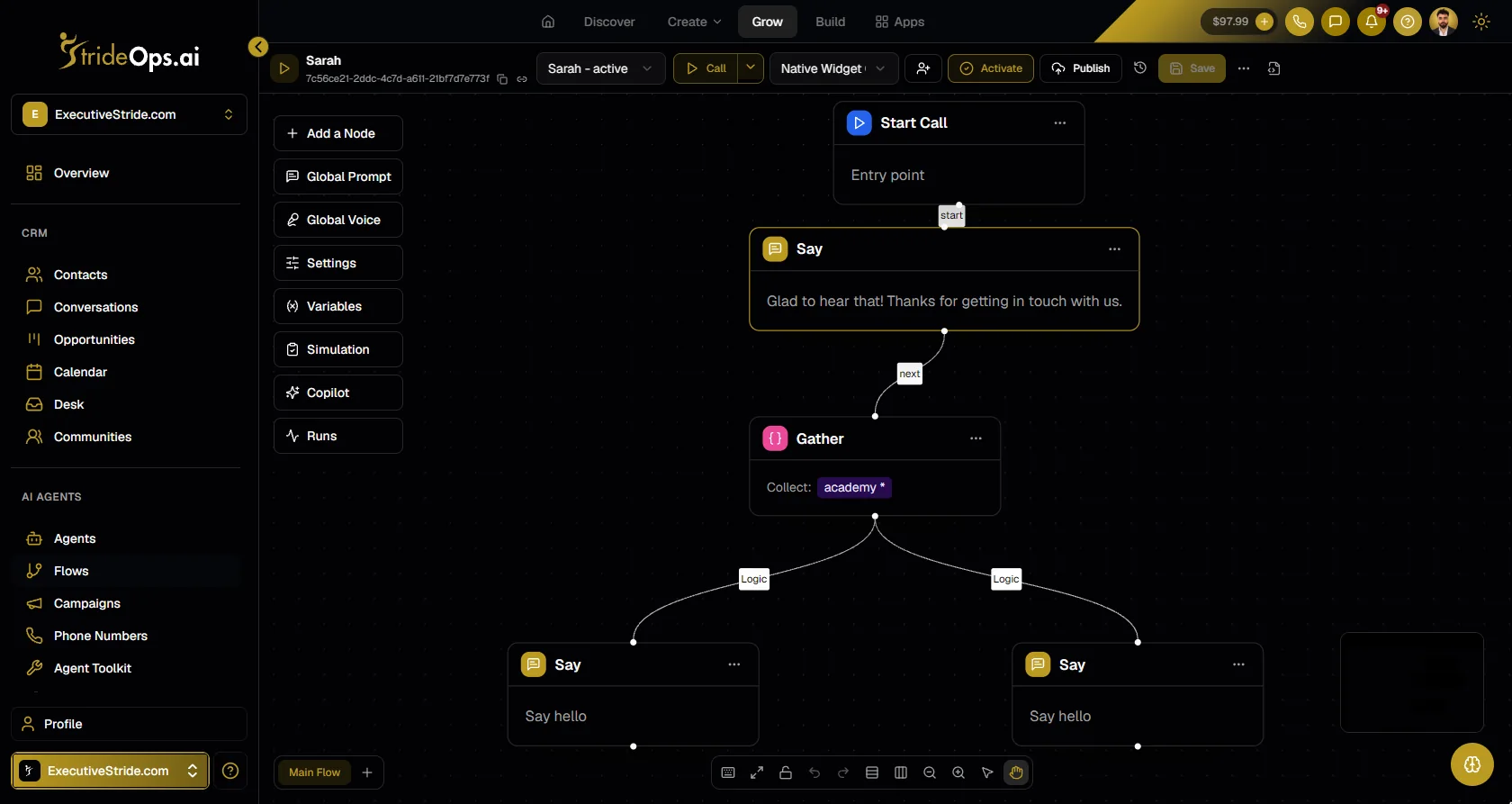
In StrideOps, a voice agent can run from a prompt like the template above, or from a visual Voice Flow where each part of the script is a step (say, gather, branch, API request, end). Agents use your knowledge base, book straight onto your calendar and transfer with an SMS or email summary when you turn on notify on transfer. The full setup is in how to set up an AI receptionist.
Script variations by business
The template stays the same; the CALLS YOU HANDLE and GUARDRAILS sections change most. Starting points:
| Business | Add to "calls you handle" | Add to "guardrails" |
|---|---|---|
| Home services | Estimates, service area checks, arrival windows | No quotes before a visit; emergencies go to on-call |
| Clinics and practices | New-patient and follow-up bookings, office questions | No clinical advice; red-flag symptoms to urgent care; insurance to staff |
| Salons and spas | Bookings by stylist and service length | Policies read exactly; no promises about results |
| Restaurants | Hours, reservations or booking link, catering capture | Allergy questions always to staff |
| Agencies and B2B | Discovery call booking, qualifying questions | No pricing commitments; complex scopes to a person |
Industry versions with example calls are on the blog, for example AI receptionist for dental office teams and AI receptionist for property management.
Test the script before callers do
Run these ten calls against your agent and fix anything that fails:
- A routine booking, start to finish.
- A reschedule of an existing booking.
- A question your knowledge base answers.
- A question it does not answer (it should use the "let me confirm" line).
- A caller who asks for a person.
- An upset caller.
- A caller who interrupts mid-sentence.
- A caller on a noisy line.
- Something on the "never handle" list.
- A wrong number.
Mistakes that break AI receptionist scripts
- Writing a wall of text. Long paragraphs get followed loosely. Short numbered instructions get followed exactly.
- No guardrails section. Without "never" rules, the agent will try to help with everything, including things it should not.
- No answer for "I don't know". Give it an exact line for unknown answers, or it will improvise.
- Testing with your own voice only. You are the easiest caller it will ever get.
FAQ
What should an AI receptionist script include?
An AI receptionist script should include the agent's identity, a greeting, the call types it handles, booking rules, an instruction to answer only from your knowledge base, guardrails, transfer rules and a closing line.
How do you write a prompt for an AI receptionist?
Write short numbered instructions grouped by section, use exact lines for key moments like the greeting and transfers, and tell it what to say when it does not know an answer. Then test it against difficult callers.
What should a receptionist say when answering the phone?
Thank the caller, name the business, give the receptionist's name and ask how you can help, for example: "Thanks for calling Bright Smile Dental, this is Ava. How can I help you today?"
Should an AI receptionist say it is an AI?
It should say so when asked, and many businesses state it up front. Being honest about it builds trust, and callers mostly care that they get helped quickly.
The bottom line
A good AI receptionist script reads like the brief you would give a great new hire: who you are, what you handle, what you never do and when to get help. Copy the template, fill in the brackets, test it against hard callers and refine it from real calls. See how StrideOps voice agents run it.
Turn your script into a receptionist that answers every call
Paste the script into a voice agent or build it as a Voice Flow, connect your knowledge base and calendar, and test it before real callers hear it.
About the author

Josh Pocock
Founder & CEO, StrideOps.ai
Josh Pocock is the founder and CEO of StrideOps.ai. He spent eight years building sales and marketing companies - most recently Executive Stride, the AI appointment-setting agency that now runs end to end on StrideOps.ai as customer zero. He went all-in on the platform full-time in late 2025.
Josh Pocock is the founder and CEO of StrideOps.ai. He scaled his own AI agency past $50K a month, and his agency Executive Stride has built systems for 400+ businesses. StrideOps started as the platform he built to replace that stack.
Read more
After Hours AI Receptionist: Catch the Calls You Miss
After hours AI receptionist setup: answer every evening and weekend call, book the next open slot, route emergencies to on-call staff, and follow up by text.
AI Receptionist Pros and Cons: Is It Worth It?
AI receptionist pros and cons for small businesses: the real benefits, the real drawbacks, and a quick checklist to decide whether one is worth it for you.
AI Receptionist vs Human Receptionist: An Honest Split
AI receptionist vs human receptionist: what each does better, where AI falls short, and the hybrid setup most small businesses end up using.