If you want to know how to test an AI voice agent properly, start by retiring the usual method: calling it yourself three times, hearing it book once, and shipping it. Real callers mumble, interrupt, call from cars and ask things you never thought of.
To test an AI voice agent, write a test set of realistic caller scenarios with expected outcomes, run them as simulated callers with different voices, noise and interruption habits, score every run against fixed checks, and rerun the whole set after every prompt or flow change.
This is the testing process I would put any voice agent through before a customer hears it, and what to keep testing once it is live.
Step 1: write the test set
A test set is a spreadsheet of scenarios, one per row, each with what the caller wants and what should happen. Start with 20 to 30 rows:
| Scenario | Caller says | Expected outcome |
|---|---|---|
| Happy path booking | Wants a quote visit next week | Books a slot, confirms date and time |
| Reschedule | Has an appointment, needs another day | Finds the booking, moves it |
| Out-of-scope question | Asks for advice your staff should give | Declines politely, offers a transfer |
| Price pressure | Asks for a discount twice | Gives the published range, never invents a discount |
| Angry caller | Complains about a past visit | Transfers to a person with a summary |
| Wrong number | Calls for a different business | Ends the call politely |
Cover the calls you get every day, then the ones that go wrong. The second group is where agents fail.
Step 2: test with simulated callers, not just your own voice
You are the easiest caller your agent will ever get. You speak clearly, you know the script and you are patient. Simulated callers can be none of those things.
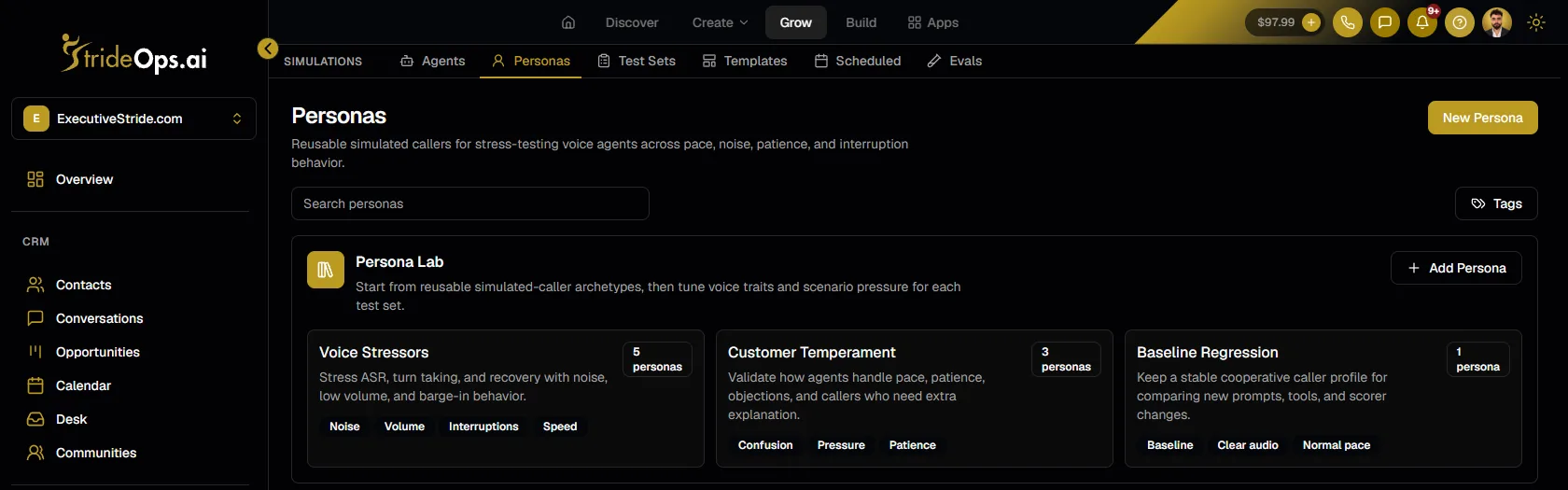
Build personas for the conditions that break agents:
- Voice stressors: background noise, low volume, fast talkers, callers who interrupt mid-sentence.
- Temperament: confused callers who need things explained twice, impatient ones, ones who push back.
- A baseline: one calm, clear caller you keep fixed, so you can compare runs before and after a change.
Step 3: score every run the same way
"It sounded good" is not a result. Decide the checks in advance and apply them to every run:
- Did it reach the outcome? Booked, transferred, answered, ended correctly.
- Did it stay on script? Followed the call steps, asked the required questions.
- Did it make anything up? Prices, policies, discounts or promises that are not in your knowledge base.
- Did it handle the stress? Recovered from interruptions and noise without looping.
Score pass or fail per check, per scenario. A failing case should point you at the part of the call that caused it, so you fix the step, not the whole prompt.
Step 4: rerun after every change
The most common failure is not a bad first version. It is a good version broken by a small fix. You change the greeting to sound friendlier and the agent stops asking for the caller's phone number.
Run the full test set after every prompt or flow change, and on a schedule, so a change made on Tuesday is checked by Wednesday. Treat a drop in the pass rate as a blocker for publishing.
Step 5: keep testing after launch
Testing does not end at go-live:
- Score real calls with the same checks. Apply your scorers to real transcripts, not only simulations.
- Turn bad calls into test cases. Every real call that went wrong becomes a new row in the test set, so it can never quietly come back.
- Alert on failures. Failing scores should reach you by email, Slack or a webhook, with edge cases in a human review queue.
A scorecard for each test run
Score every scenario the same way so runs are comparable:
| Check | Pass when |
|---|---|
| Outcome | Booked, transferred, answered or ended as the scenario expects |
| Required questions | Every question the script requires was asked |
| No invented facts | No prices, policies or promises outside the knowledge base |
| Interruptions | Stops, listens and responds to what was just said |
| Noise and accents | Understands the caller without repeated "sorry, could you repeat that" |
| Hand-off | Transfers with a summary when it should, and only then |
A run passes when every scenario passes every check. One failure is a blocker for publishing the change.
Regression testing in practice
The point of a regression suite is catching what a fix breaks. An example: you shorten the greeting to sound friendlier. The next scheduled run shows three booking scenarios now fail, because the shorter greeting dropped the line asking for the caller's name, and later steps depended on it. Without the suite, you would have found out from real callers.
How this works in StrideOps
StrideOps Simulations covers each step above: personas for simulated callers with their own voice, patience, background noise and interruption habits; test sets as editable spreadsheets with expected outcomes; scorers that check every run (did it book, did it stay on script, did it invent a discount); scheduled regression runs; alerts to email, Slack or a webhook; a human review queue; and call traces that point a failing case at the flow node that caused it.
The voice agent testing loop

Test set
Scenarios with expected outcomes
Simulated callers
Personas with noise and interruptions
Scored runs
Pass or fail on fixed checks
Scheduled regressions
Rerun after every change
See the full setup on voice agent testing.
FAQ
How do you test an AI voice agent?
Write a test set of caller scenarios with expected outcomes, run them as simulated callers with varied voices, noise and interruptions, score each run against fixed checks, and rerun the set after every change.
How many test cases does a voice agent need?
Start with 20 to 30 scenarios covering your everyday calls and the ones that go wrong, then add a case for every real call that fails. The test set should grow as the agent does.
What should you check in a voice agent test?
Check whether it reached the right outcome, followed the call steps, avoided inventing prices or policies, and recovered from interruptions and background noise.
Can you test a voice agent without making real calls?
Yes. Simulated callers can run your whole test set against a draft agent, with different voices, temperaments and noise, before any real caller hears it.
What is regression testing for voice agents?
Rerunning the same test scenarios after every change to the prompt, flow or knowledge base, so a change that improves one call does not quietly break another.
Should I test my voice agent with real people too?
Yes. Simulated callers cover volume and edge cases; a handful of real test calls from colleagues or friends catches the things that only sound wrong to a human ear.
The bottom line
A voice agent is only as good as the worst call it handles. Test it against the callers who will break it, score every run the same way, and rerun after every change. The agents that sound great in a demo and fail in week one were never tested; they were tried.
Prove a voice agent before it takes real calls
Simulated callers, spreadsheet test sets, scored runs and scheduled regressions, then the same scorecards on every real call.
About the author

Josh Pocock
Founder & CEO, StrideOps.ai
Josh Pocock is the founder and CEO of StrideOps.ai. He spent eight years building sales and marketing companies - most recently Executive Stride, the AI appointment-setting agency that now runs end to end on StrideOps.ai as customer zero. He went all-in on the platform full-time in late 2025.
Josh Pocock is the founder and CEO of StrideOps.ai. He scaled his own AI agency past $50K a month, and his agency Executive Stride has built systems for 400+ businesses. StrideOps started as the platform he built to replace that stack.
Read more
After Hours AI Receptionist: Catch the Calls You Miss
After hours AI receptionist setup: answer every evening and weekend call, book the next open slot, route emergencies to on-call staff, and follow up by text.
AI Receptionist Pros and Cons: Is It Worth It?
AI receptionist pros and cons for small businesses: the real benefits, the real drawbacks, and a quick checklist to decide whether one is worth it for you.

AI Receptionist Script: A Copy-and-Paste Template
AI receptionist script template to copy: identity, greeting, the calls it handles, booking, FAQs, guardrails, transfers and the close, with example lines.